Wiris

Documentation / MathType

  • Demos
  • Visit our website
  • Downloads
  • Contact us
  • MathType

    • WirisQuizzes

      • LearningLemur

        • CalcMe

          • MathPlayer

            • Store FAQ

              • VPAT for the electronic documentation

                • MathFlow

                  • BF FAQ

                    • Miscellaneous

                      • Wiris Integrations

                        • Home
                        • MathType
                        • Troubleshooting & FAQs
                        • Activation and licensing
                        • Activation and licensing

                        MathType 7 for Windows product key validation error

                        Reading time: 1min

                        This article only applies to MathType 7 for Windows. If you're using MathType 7 for Mac and encountering a product key validation error, please visit this documentation page. 


                        Overview

                        Starting in January 2025, a global security update to our licensing servers caused incompatibility between MathType 7 for Windows and the updated security certificates. As a result, users may encounter a product key validation warning, even when submitting a valid key.


                        This article outlines how to resolve this issue.

                        Note that this only applies to valid and unexpired product keys. If your product key has already expired, you will need to purchase a new one.


                        Step 1: Verify Your MathType Version

                        Ensure you are using the latest version of MathType 7 (v7.10.1.458)

                        To check your version:

                        • Open MathType.
                        • Go to Help > About MathType.

                        If you are using an older version, download and install the latest version from the official site:

                        Download the latest version of MathType 7


                        Step 2: Clear Legacy Licensing Data from Windows Registry

                        Even with the latest version, Windows may retain outdated registry values that interfere with product key validation. To resolve this:

                        • Open MathType.
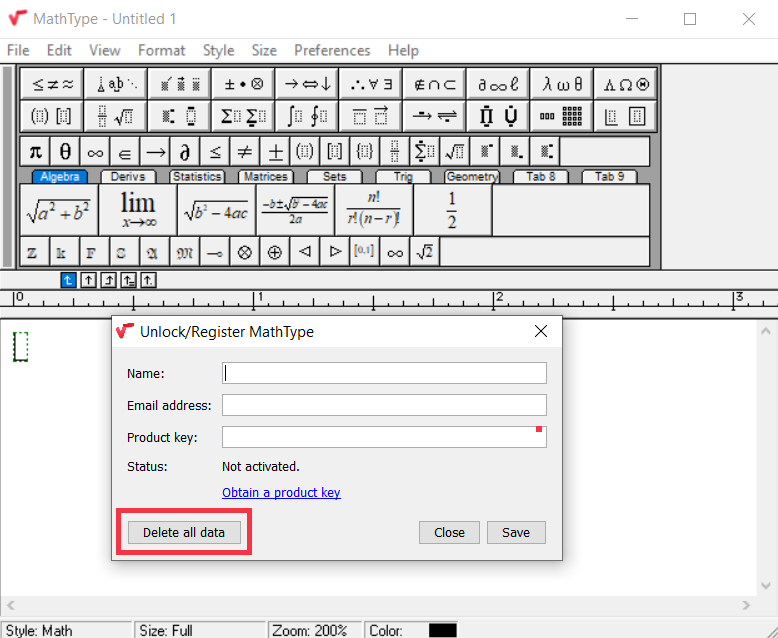
                        • Go to Help > Unlock/Register MathType...
                        • Click "Delete all data."
                        • Re-enter your product key. 


                        Step 3: Check for Network Restrictions (Proxy/Firewall)

                        If the issue persists, your network might be interfering with the validation process.

                        Questions to Consider

                        • Are you or your organization using a proxy server or firewall?
                        • What antivirus software or endpoint protection are you using?

                        These can block communication with the licensing server.


                        Step 4: Check Internet Connection and Proxy Settings

                        • Right-click the Start button and select Settings.
                        • Navigate to Network & Internet > Proxy.
                        • Check if "Use a proxy server" is enabled.


                        Step 5: Verify Connection to Licensing Server

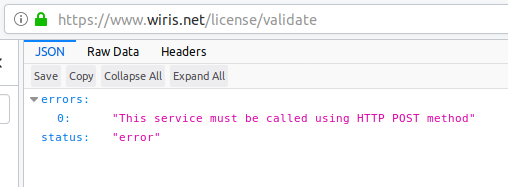
                        Try accessing the following URL in your web browser:

                        https://www.wiris.net/license/validate

                        Please find an image below depicting the expected response of the link in the web browser:
                        If You Are Behind a Proxy

                        Contact your network administrator or proxy provider and request that they whitelist:

                        www.wiris.net


                        Additional Workarounds

                        If access to the licensing server is not possible you can try to temporarily disable the firewall or network filters to allow license validation.


                        Final Note

                        If your network continues to block access to www.wiris.net, the issue may happen again even after applying the above steps. Ensuring ongoing connectivity to our license server is essential for smooth operation.


                        Was this article helpful?

                        Give feedback about this article

                        Related Articles

                        • MathType Preferences Problem when inserting equations into Microsoft Word
                        • MathType toolbar has become disconnected from the main window
                        • Warning: The Text style uses the 'Times' (Plain) font, which is not available
                        • MathType 7 support for Microsoft PowerPoint

                        MathType 7 for Windows product key validation error

                        Overview Step 1: Verify Your MathType Version Step 2: Clear Legacy Licensing Data from Windows Registry Step 3: Check for Network Restrictions (Proxy/Firewall) Questions to Consider Step 4: Check Internet Connection and Proxy Settings Step 5: Verify Connection to Licensing Server If You Are Behind a Proxy Additional Workarounds Final Note

                        Empowering STEM education

                        MathType

                        • Office Tools
                        • LMS
                        • XML
                        • HTML

                        WirisQuizzes

                        Learning Lemur

                        Integrations

                        Solutions

                        • Education
                        • Publishing houses – platforms and interactive
                        • Publishing houses – Print and digital
                        • Technical writers

                        Pricing

                        Downloads

                        Blog

                        • Success stories

                        About us

                        • Careers
                        • Partnership

                        Contact Us

                        Contact Sales

                        • Cookie Policy
                        • Terms of Use
                        • Privacy Policy / GDPR
                        • Student Data Privacy
                        • Compliance
                        • Cookie Settings

                        © Wiris 2026

                        Expand