Wiris

Documentation / MathType

  • Demos
  • Visit our website
  • Downloads
  • Contact us
  • MathType

    • WirisQuizzes

      • LearningLemur

        • CalcMe

          • MathPlayer

            • Store FAQ

              • VPAT for the electronic documentation

                • MathFlow

                  • BF FAQ

                    • Miscellaneous

                      • Wiris Integrations

                        • Home
                        • MathType
                        • Troubleshooting & FAQs
                        • Installation and activation
                        • Installation and activation

                        MathType 7 for macOS product key validation error

                        Reading time: 1min

                        This article applies only to MathType 7 for Mac. If you're using MathType 7 for Windows and encountering a product key validation error, please visit this documentation page. 


                        Overview

                        Starting in January 2025, a global security update to our licensing servers caused incompatibility between MathType 7 and the updated security certificates. As a result, users may encounter a product key validation warning, even when submitting a valid key.


                        In order to fix this issue, we have created a patch that is applied by replacing a file in the MathType installation directory. 

                        Note that this only applies to valid and unexpired product keys. If your product key has already expired, you will need to purchase a new one.


                        Steps to Apply the Fix


                        1. Download the Patch

                        MathTypeLib.zip


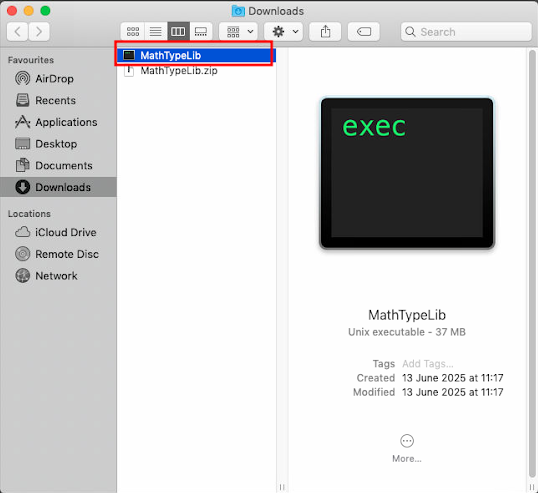
                        2. Unzip the File

                        Locate MathTypeLib.zip in your Downloads folder and double-click it. This will extract the MathTypeLib executable.
                         

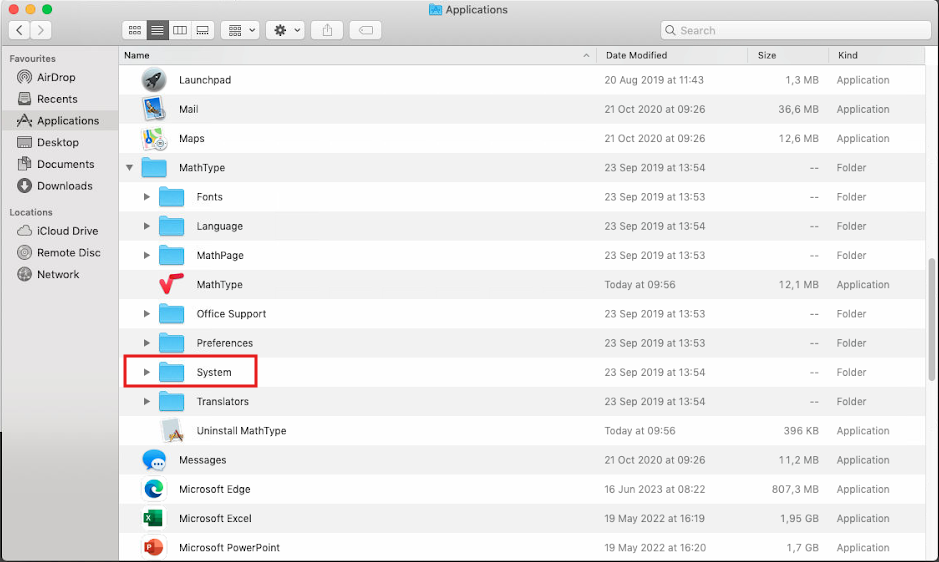
                        3. Access the MathType Installation Folder

                        Open the Applications folder in Finder and navigate to MathType > System. 

                        Please note that if you changed the default installation directory, you'll need to navigate to the MathType application folder. 


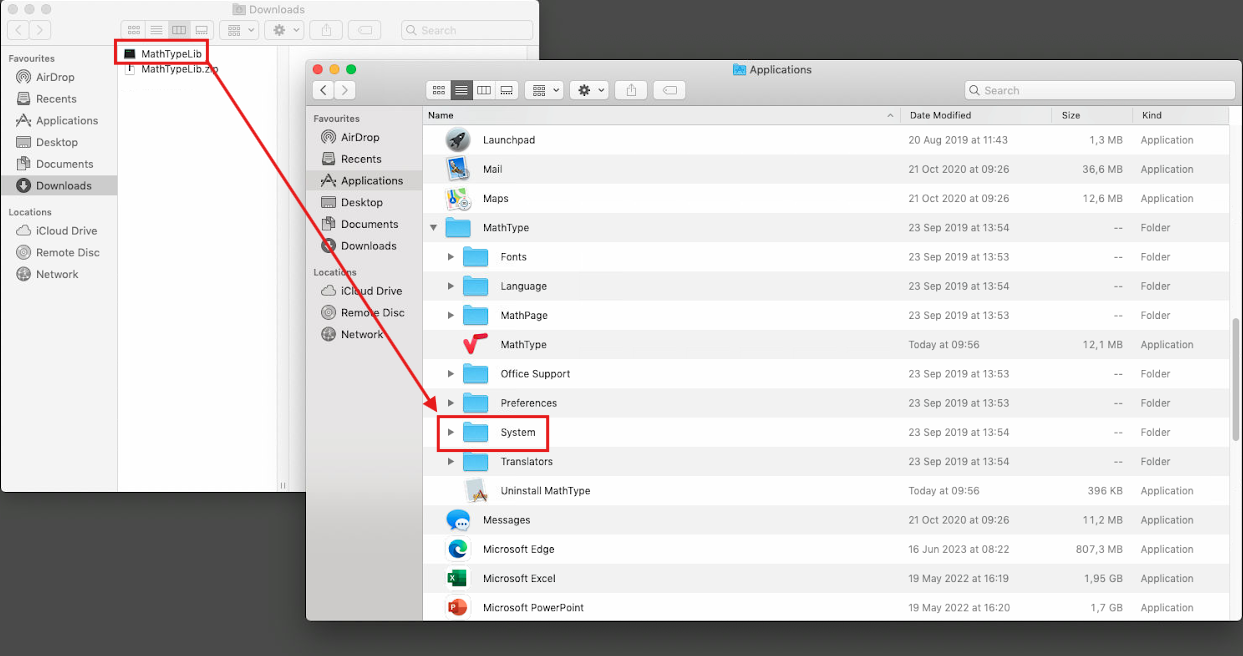
                        4. Replace the File

                        Drag and drop the new MathTypeLib file from Downloads into the MathType > System folder.
                         

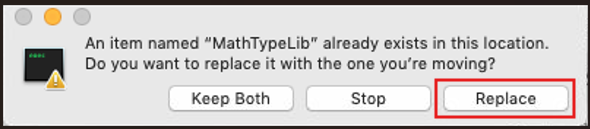
                        When prompted that the file already exists, choose Replace.
                         

                        5. Activate MathType

                        Launch the MathType for Mac application and go to Help > Unlock/Register MathType… to enter your details and product key.
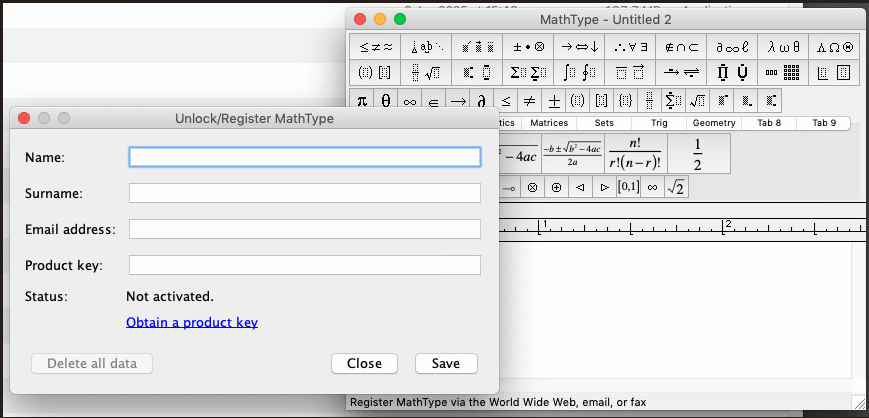
                         

                        MathType should now activate and be fully functional.


                        Notes:

                        The latest supported version for Mac is MathType 7.4.4.536. If you're using an older version, we recommend updating to the latest one. 

                        Please find the installer on this page.


                         Please note that if you ever uninstall and reinstall MathType, you will need to apply the fix again by repeating the above steps.


                        Was this article helpful?

                        Give feedback about this article

                        Related Articles

                        • Error message: Problem Converting OMML to MathML
                        • Error message in Word and PowerPoint for macOS in Catalina and Big Sur caused by previous MathType installation
                        • Nothing happens when trying to insert or edit an equation in Pages, Keynote, or Numbers
                        • Network administrator's manual

                        MathType 7 for macOS product key validation error

                        Overview Steps to Apply the Fix 1. Download the Patch 2. Unzip the File 3. Access the MathType Installation Folder 4. Replace the File 5. Activate MathType Notes:

                        Empowering STEM education

                        MathType

                        • Office Tools
                        • LMS
                        • XML
                        • HTML

                        WirisQuizzes

                        Learning Lemur

                        Integrations

                        Solutions

                        • Education
                        • Publishing houses – platforms and interactive
                        • Publishing houses – Print and digital
                        • Technical writers

                        Pricing

                        Downloads

                        Blog

                        • Success stories

                        About us

                        • Careers
                        • Partnership

                        Contact Us

                        Contact Sales

                        European union (European Regional Development Fund) and 1EdTech (TrustEd Apps Certified)
                        • Cookie Policy
                        • Terms of Use
                        • Privacy Policy / GDPR
                        • Student Data Privacy
                        • Compliance
                        • Cookie Settings

                        © Wiris 2026

                        Expand